The $4k Question: Buying a Mac Studio Instead of Renting a Model
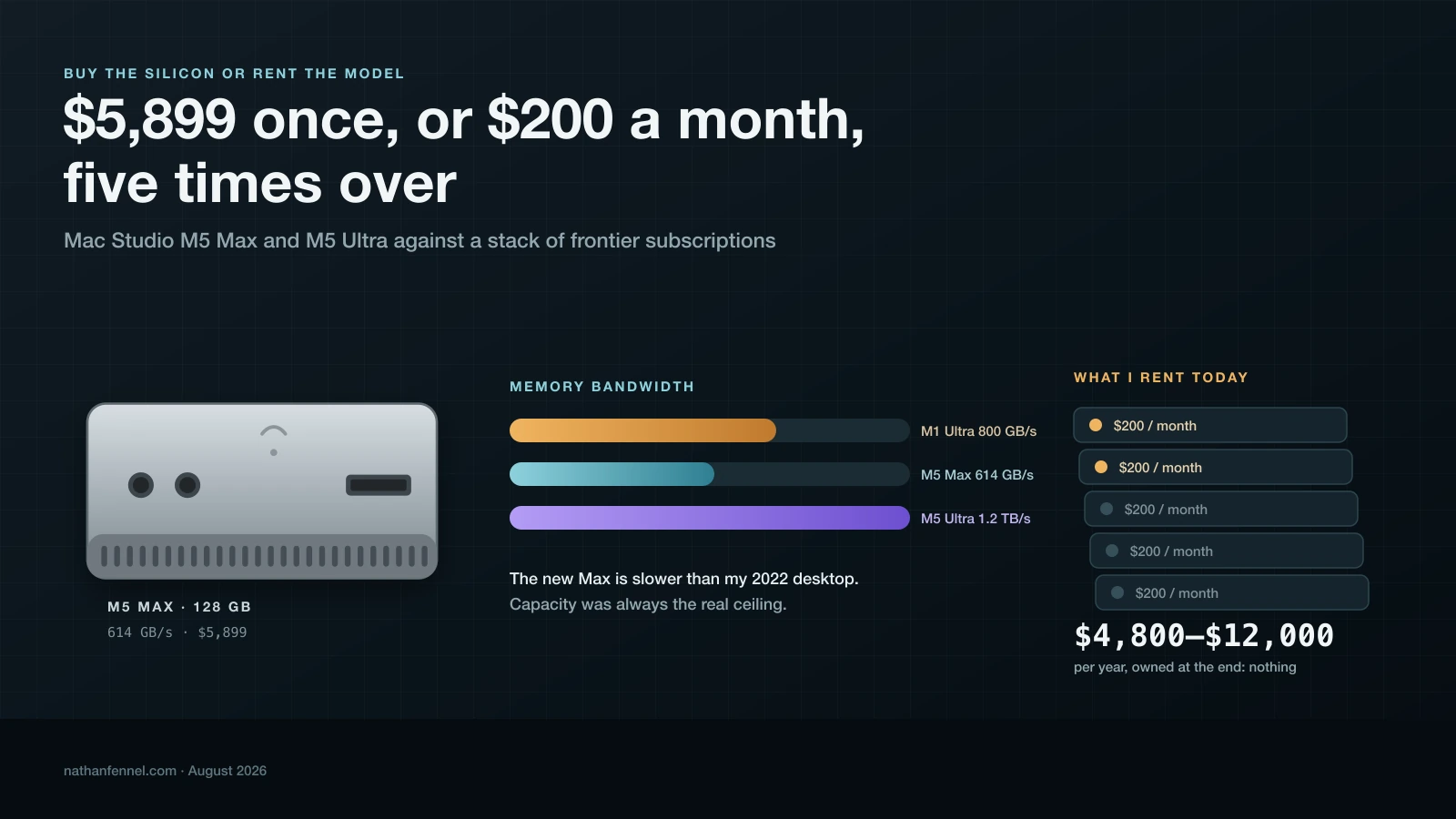
I pay for up to five $200/month AI subscriptions. The new M5 Mac Studio can hold frontier-class open weights in memory. Working out which one to buy corrected me twice.
Apple's new Mac Studio can hold a 320-billion-parameter open-weight model in memory and generate from it faster than most API streams, which finally makes local AI a real question instead of a hobby. Then I priced the tokens, and the only argument that survived was privacy.
I have been telling people my M1 Ultra Mac Studio doesn't have the bandwidth to run a real local model. I said it enough times that it turned into a fact I stopped checking.
It's wrong.
The M1 Ultra moves 800GB/s while the M5 Max, the machine I was already planning to buy, tops out at 614GB/s. My four-year-old desktop has about 30% more memory bandwidth than the new one I'm looking at. Apple just pre-announced the M5 lineup (including the Mac Studio) and it ships in just a couple weeks.
What I don't actually have is an extra 64GB of RAM. This is more of a capacity problem than a bandwidth problem. My computer has plenty of bandwidth.
What I pay now
Somewhere between two and five subscriptions at $200/month, depending on the month and what I'm shipping. Call it $400 to $1,000/month, or $4,800 to $12,000/year.
What I'm getting for that money is hard to replace. I get frontier models the week they launch, effectively no setup, fast tokens (most of the time), and more importantly parallel tokens, because I run several accounts at once and let them chew on different problems. I get no marginal cost per request, so I never think about whether a question is worth asking and limits that are generous (for now).
But, the money I pay is harder to put on a line item. Every single prompt goes to someone else's server and when the year ends I own nothing (aside from the code generated). When a provider has a bad afternoon, I lose out on what that subscription can do. And all of it assumes a working internet connection.
I went through a whole subscription audit in June. The conclusion then was that subscriptions beat the API for interactive work by a crazy wide margin (like 19x). That's still true, but now I'm looking at another dimension: whether buying silicon beats renting anything.
Three machines
These specs guide my buying decision. I ignored a lot of the subtle differences that some people care about (I'm sorry if USB-C Speeds matter to you). The only connectivity spec that changes anything about AI work for me is display support (I get to that further down):
M1 Ultra (mine, 2022)
M5 Max (2026)
M5 Ultra (2026)
CPU
20-core (16P + 4E)
18-core (6 super + 12 perf)
30-core, up to 36
GPU
48-core
32-core or 40-core
64-core or 80-core
Neural accelerators in GPU cores
No
Yes
Yes
Neural Engine
32-core
16-core
32-core
Memory bandwidth
800GB/s
460 or 614GB/s
1.2TB/s
Unified memory
64GB (max 128)
36/48/64/128GB
96/256/512GB
Realistic budget for weights
~54GB
~109GB
~218GB / ~435GB
Max displays
5 (4x 6K@60 + 4K@60)
5 (4x 6K@60 or 4K@165, +5K@60)
8 (6K@60 or 4K@165)
Price as configured
$3,999 in 2022
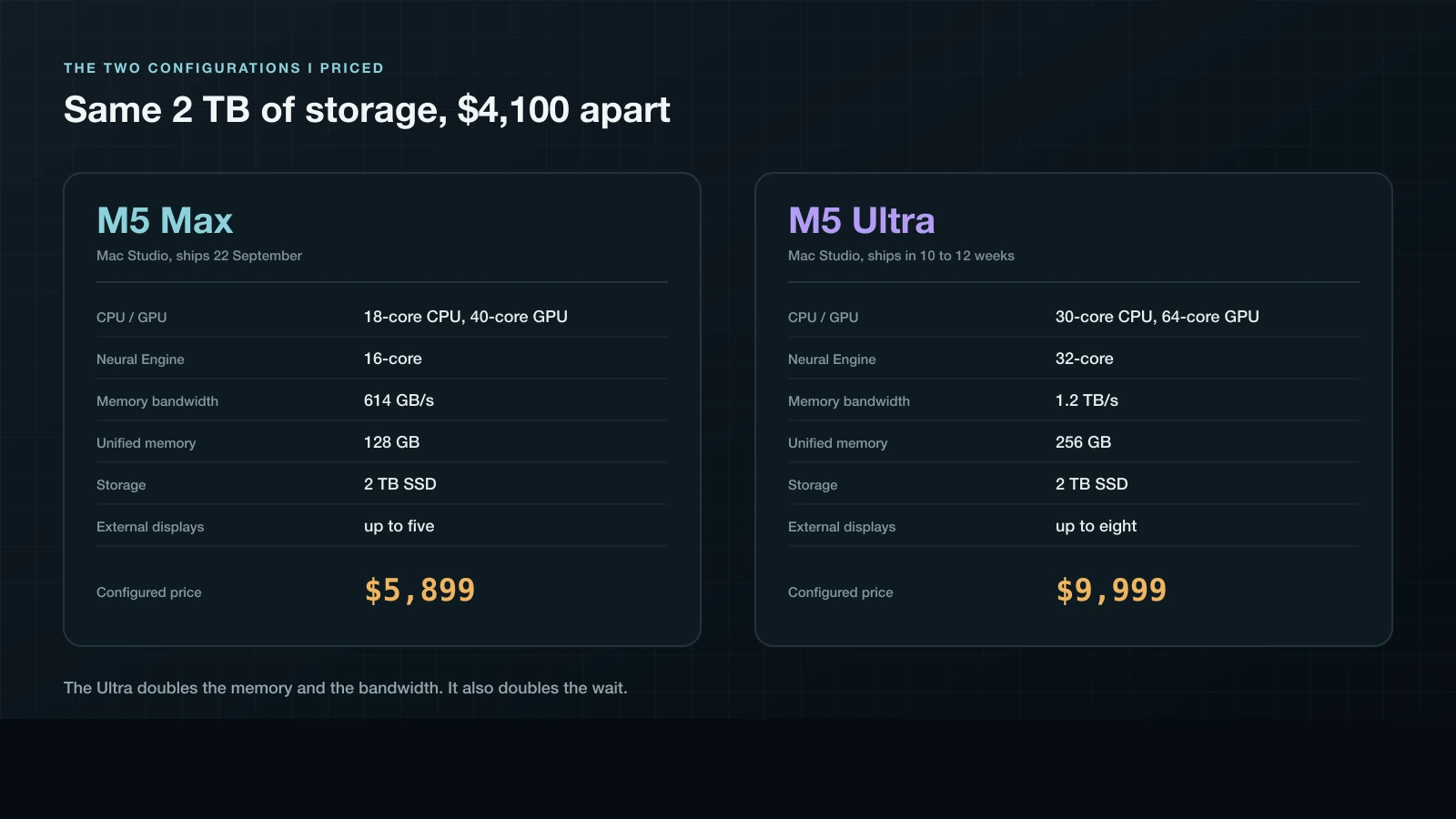
$5,899
$9,999
• The M5 Max column is the 40-core GPU at $3,099, plus $2,000 for 128GB, plus $800 for 2TB.
• The Ultra is the $5,499 base, plus $4,000 for 256GB, plus $500 for 2TB. At 1TB the Ultra is $9,499, and matched at 2TB it's $9,999.
Either way, the gap is $4.1k, and that number is basically this whole post.
It's absolutely worth knowing before you get attached to the idea: Apple's configurator quotes 10 to 12 weeks to ship the 256GB Ultra. The 128GB Max is a September 22 machine. The Ultra is a Christmas machine.
In my opinion, two things in that table deserve far more attention than they get in reviews.
The 512GB Ultra isn't vaporware or a rumor for later this year. It's announced, has a release date, but it just can't be ordered until late October. Apple hasn't published its price. Apple charges $4,000 to go from 96GB to 256GB, which is $25 per gigabyte. Another 256GB at that rate would be $6,400. My $10k guess is above the line Apple has already drawn, though the 16TB SSD at $7,500 suggests they price the top of a range however they like.
And the Neural Engine column is a trap. My four-year-old machine has twice as many "Neural Engine cores" as the M5 Max. That number itself is pretty much irrelevant to this entire decision, which brings me to the part I actually had to dive deep and go read about.
How the GPU changes AI performance
Running a model has two phases: prefill and decode. Each of them bottleneck on completely different hardware.
Prefill is the model reading the prompt. Every token gets processed together, which becomes large matrix-by-matrix multiplication. This is compute-bound and it is exactly what GPU cores are good at. Prefill is what you feel when you paste a massive codebase into a session and watch nothing happen for eleven seconds.
Decode is the model writing one token at a time. Producing each token means reading the model's active weights out of memory for matrix-by-vector multiplication instead of matrix-by-matrix multiplication. The arithmetic units finish almost immediately and then idle until memory catches up. Decode is bandwidth-bound, and throwing GPU cores at it accomplishes close to nothing.
That split explains the spec sheet. The M5's real change is a neural accelerator built into every GPU core, dedicated matrix-multiply hardware. So look at what Apple chose to advertise: "up to 9.8x faster LLM prompt processing" on M5 Ultra versus M1 Ultra. The new silicon speeds up prefill. Token generation speed is still governed by GB/s, which Apple lists on the specs page and never puts in a headline.
Be careful with the M5 Max version of that claim. Apple's 10.7x prompt processing figure is measured against the M1 Max, not the M1 Ultra. There is no published M5 Max versus M1 Ultra number, and given the bandwidth goes down, I would not assume one.
Then there's an Apple-specific wrinkle. You can't buy bandwidth by itself. The 32-core M5 Max gets 460GB/s and the 40-core gets 614GB/s, so the GPU upgrade is how you buy the memory bus. Going from the $2,499 base to the 40-core part costs $600 and takes you to $3,099, which also bumps the included memory from 36GB to 48GB. It's the easiest $600 on the page to talk yourself out of if you assume you don't care about graphics, and it buys a third more tokens per second.
Meanwhile the Neural Engine, the part with "neural" in the name, does almost nothing here. MLX and llama.cpp run on the GPU. Comparing 32 Neural Engine cores to 16 tells you nothing about local LLM performance.
Does a high-resolution monitor slow the model down?
I wondered about this because I use a lot of screen and I was about to spend a lot on memory.
No, and the arithmetic is small enough to do in your head. A 6K display is 6016 by 3384 pixels. At 4 bytes per pixel that's 81MB per frame, and at 60Hz the display controller pulls roughly 4.9GB/s out of unified memory just to keep an image on the glass. Against the M5 Max's 614GB/s that's 0.8%. Against the M5 Ultra's 1.2TB/s, 0.4%. A 4K panel at 165Hz lands in the same neighborhood, about 5.5GB/s. Even the Ultra driving all eight displays gives up around 3%.
Capacity is the marginally more real cost. Double-buffer a 6K panel and you've spent about 160MB, and macOS holds compositing surfaces for every window on top of that. Call it a few hundred megabytes per display. Four 6K panels might cost you 1 to 2GB. On a 128GB machine where you're trying to hand 109GB to a model, that's worth knowing and not worth worrying about.
Plug in the monitors. Dropping from 4-bit to 3-bit quantization costs you more than every display you own.
What fits where
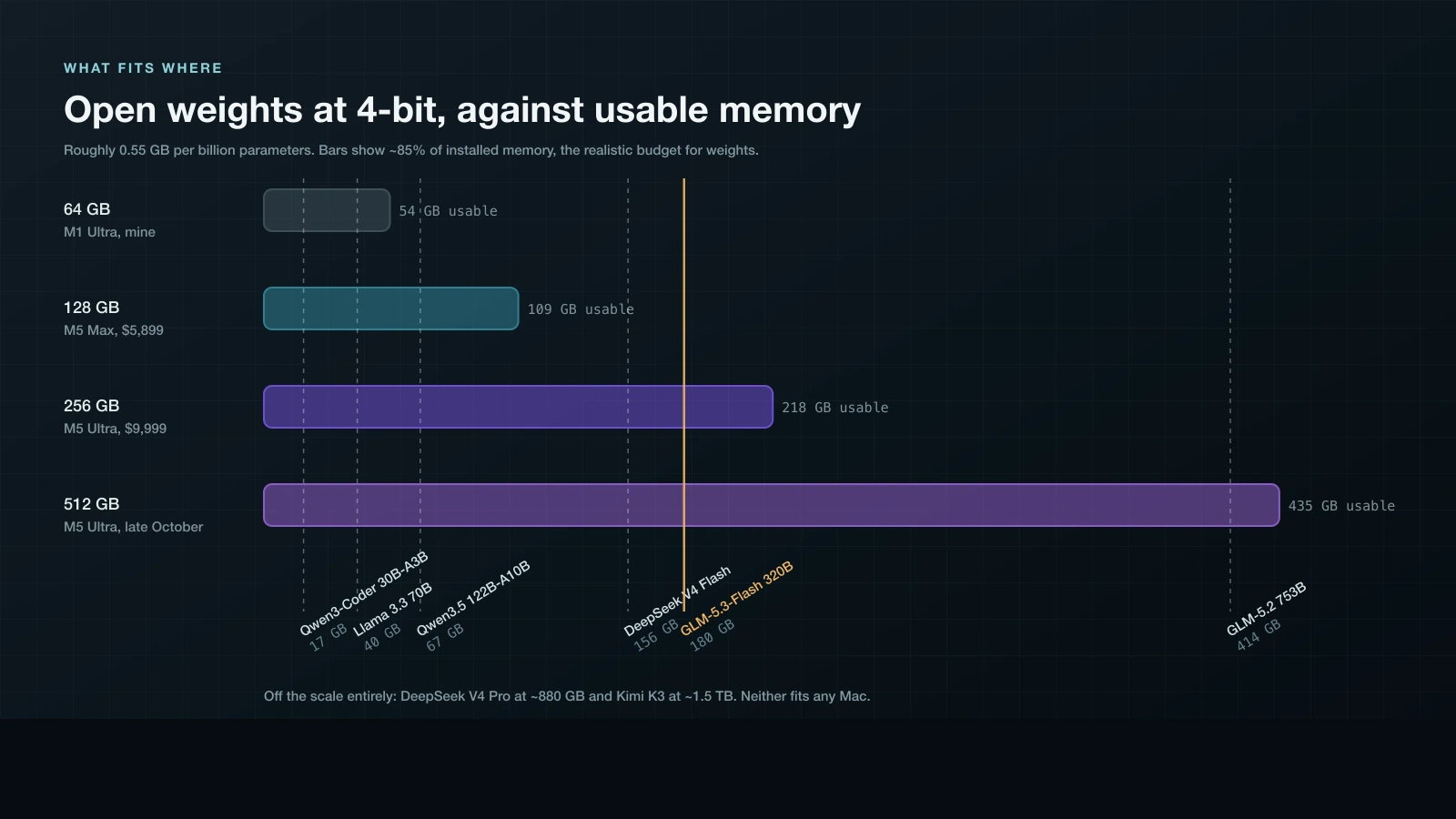
Four-bit weights run about 0.55GB per billion parameters once you include the quantization overhead. macOS won't hand the GPU every byte, so budget around 85% of installed memory for weights and leave real room for KV cache, which grows with context and gets big fast at 100K+ tokens.
Model
Params (total/active)
~4-bit size
64GB
128GB
256GB
512GB
Qwen3-Coder 30B-A3B
30B / 3B
~17GB
Yes
Yes
Yes
Yes
Gemma 4 31B
31B
~17GB
Yes
Yes
Yes
Yes
Qwen 3.6 35B-A3B
36B / 3B
~20GB
Yes
Yes
Yes
Yes
Llama 3.3 70B
70B dense
~40GB
Tight
Yes
Yes
Yes
Qwen3.5 122B-A10B
122B / 10B
~67GB
No
Yes
Yes
Yes
DeepSeek V4 Flash
284B / 13B
~156GB
No
No
Yes
Yes
GLM-5.3-Flash
320B / 18B
~180GB
No
No
Yes
Yes
DeepSeek V4 Pro
1.6T / 49B
~880GB
No
No
No
No
GLM-5.2
753B / 40B
~414GB
No
No
No
Yes
Kimi K3
2.8T / 104B
~1.5TB
No
No
No
No
Kimi K3 is the one to notice at the bottom. It sits at the top of the open-weight coding leaderboard, 88.3 on Terminal-Bench 2.1, with Z.ai's full-size GLM-5.3 a rounding error behind it at 88.2 since August 25. At 2.8 trillion parameters it doesn't fit on any Mac you can buy, and neither does DeepSeek V4 Pro at 1.6 trillion. The frontier of open weights has moved past the frontier of desktop hardware, and it took about four months.
My M1 Ultra can already run Llama 3.3 70B at 4-bit. It has been able to this whole time. That's the second thing I was wrong about.
Short version of which model goes with which machine. At 64GB or 128GB you're in the 30B class, where Qwen3-Coder has been the default recommendation since June. 128GB adds the 100B-class MoE models like Qwen3.5 122B-A10B. 256GB is the first tier running anything I'd compare to what I rent. 512GB gets you DeepSeek V4 Flash and GLM-5.2, though GLM-5.2 at roughly 414GB leaves almost nothing for KV cache. Neither DeepSeek V4 Pro nor Kimi K3 fits at any size.
How fast, without guessing
Nobody has benchmarked M5 silicon yet. It ships September 22. So instead of quoting a ceiling nobody will hit, take numbers people actually measured on the M3 Ultra and scale them by the two multipliers Apple published.
Decode scales with bandwidth. The M3 Ultra moves 819GB/s and the M5 Ultra moves 1.2TB/s. Apple rounds that to "50 percent higher than before." The actual ratio is 1.47x, and I'll use the real one.
Prefill scales with compute, and Apple claims up to 4x faster prompt processing than M3 Ultra.
That asymmetry is the story of this generation. It's even sharper on the Max: 546GB/s to 614GB/s is 1.12x on token generation, against a claimed 3.9x on prompt processing. The new chip writes 12% faster and reads almost four times faster.
Look at the 16K row. Generation collapses from 17.8 to 5.8 tok/s as context grows, and Hardware Corner's finding is that the collapse is compute-bound rather than bandwidth-bound. That is precisely the wall the neural accelerators are built to knock down, so the honest projection there is "more than 1.47x, and I don't know by how much." The long-context number is where this generation should show up, and it's the one Apple gestures at when it advertises prompt processing instead of tokens per second.
My M1 Ultra sits within about 2.5% of the M3 Ultra on decode. 800GB/s against 819GB/s. So every measured M3 Ultra generation speed in the table above is, near enough, what my four-year-old machine already does on anything fitting in 64GB. My limit has been memory capacity.
The M5 Max, meanwhile, barely moves on generation at all. Sean Kim measured the M4 Max running Llama 3.1 70B at 4-bit at 18 tok/s on llama.cpp and 20 on MLX. Times 1.12 puts the M5 Max around 20 to 22. Perfectly usable. Nowhere near a reason to buy one.
Now put GLM-5.3-Flash through the same arithmetic, because it's the model this whole post is circling.
It has 320B parameters but only 18B active per token, against DeepSeek V3's 37B active. That's less than half the reading per token, so on the same memory bus it should run roughly twice as fast. DeepSeek V3 projects to about 31 tok/s on the M5 Ultra, which puts GLM-5.3-Flash near 60. Check it a second way. 18B at 4-bit is roughly 10GB per token. 1.2TB/s over 10GB gives a 120 tok/s ceiling. DeepSeek V3's measured 21 against its own 40 tok/s ceiling on the M3 Ultra says real hardware delivers about half, and half of 120 is 60. Two routes, same answer.
Sixty tokens a second, off weights on my own SSD under an MIT license, beats most API streams I watch. Which is why the Ultra stopped looking silly to me.
So the Ultra does earn its $4,100, on this one axis. It's the only one of these machines with room for the model I'd want, running at a speed I'd never complain about. The Max runs good models. The Ultra runs a near-frontier one.
Which would have settled it, except for what happened this week.
Then Z.ai priced it
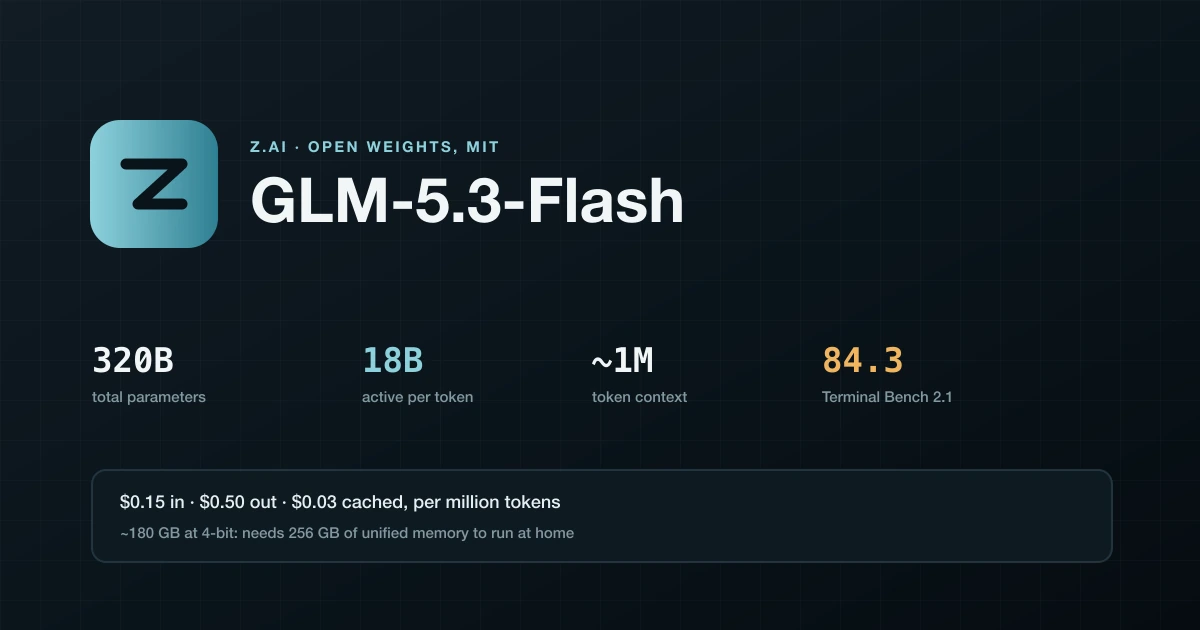
GLM-5.3-Flash is 320B total, 18B active, MIT licensed, roughly a million tokens of context, and Z.ai's own evals put it at 84.3 on Terminal Bench 2.1 against Claude Opus 4.8 at 85.0. It beats Opus on DeepSWE and Toolathlon in the same table. Those are vendor benchmarks, so discount them accordingly. A 0.7 point gap is still not the gap I expected.
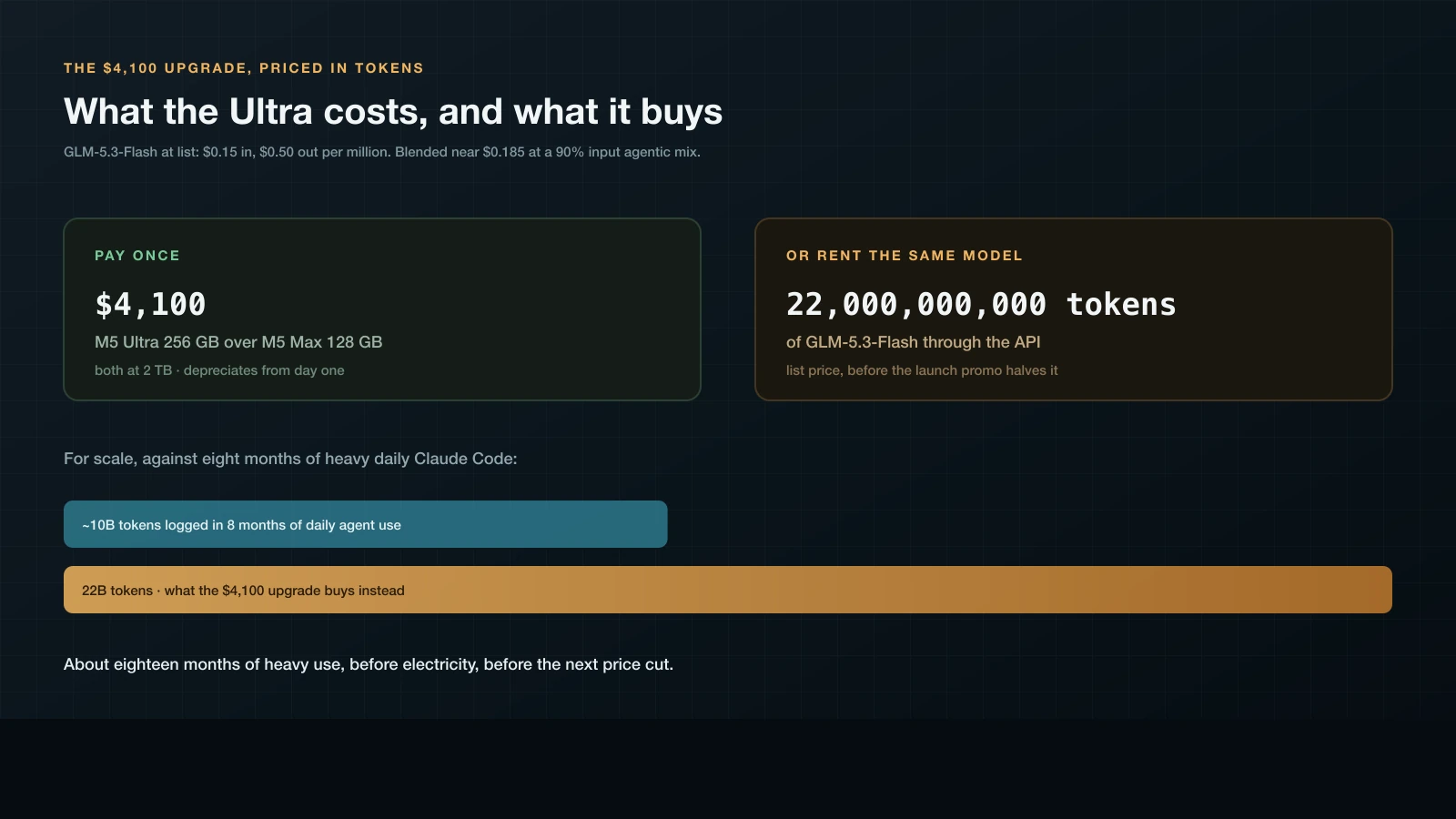
It costs $0.15 per million input tokens and $0.50 output, with cached input at $0.03. Through September 9 the launch promo halves that.
Run the agentic mix, which is somewhere near 90% input by volume because every turn resubmits the whole context. Blended, you're paying about $0.185 per million tokens.
The $4,100 gap between the two machines buys about 22 billion tokens of the same model through Z.ai's API. The entire $9,999 Ultra buys 54 billion. For scale, Kyle Redelinghuys logged around 10 billion tokens across eight months of daily Claude Code. The upgrade delta alone is a year and a half of heavy agent use, at list price, before the promo, before the next price cut, and before you count electricity.
Electricity isn't nothing but it isn't much. Assume 200W under sustained inference, twelve hours a night, thirty nights. About 72 kWh, so somewhere around $12/month at typical US residential rates.
The API side improves at no cost to me while the Mac depreciates on a schedule. I bought the M1 Ultra thinking 64GB was plenty.
Renting is much cheaper.
What you'd actually run it with
Buying the machine is the easy half. The software moved further in the last eight months than the silicon did.
Ollama switched to MLX in version 0.19, which shipped March 30. Apple's array framework replaced the llama.cpp Metal backend. Running Qwen3.5-35B-A3B, Ollama's published numbers went from 1,154 to 1,810 tok/s on prefill and 58 to 112 on decode. Read the footnote before you get excited, though. The new run is NVFP4 and the old one is Q4_K_M, so some of that is a quantization change rather than the backend, and Ollama never says which chip the benchmark ran on.
It's still a preview, it wants more than 32GB of unified memory, and at announcement only the one model got the acceleration. The upshot is worth stating plainly anyway. Ollama is now a package manager over MLX, and LM Studio is a nicer window onto the same thing.
OpenRouter sits at a different layer, so the question is routing. Anything I can't let leave the house goes to the Mac. Everything else goes to whichever model is cheapest for the job, which is the same routing problem I already worked through. GLM-5.3-Flash through OpenRouter runs a fifth of a cent per million cached tokens. No local setup competes with that on price.
Claude Code needs two environment variables. Ollama shipped the Anthropic Messages API in v0.14.0 back in January, LM Studio added /v1/messages in 0.4.1, and the translation-proxy era ended. Unset ANTHROPIC_API_KEY, point ANTHROPIC_BASE_URL at http://localhost:11434, set ANTHROPIC_AUTH_TOKEN to any non-empty string.
Then set CLAUDE_CODE_ATTRIBUTION_HEADER=0, or you pay for it. Claude Code prepends a short attribution block to the system prompt carrying its version and a fingerprint derived from the conversation. Anthropic's own endpoint strips it. Every other upstream gets it, and because the fingerprint changes as the conversation does, the cache prefix changes with it and your local server re-runs the full prefill every turn. Same shape as the ANTHROPIC_API_KEY trap from last time. Expensive default, no warning.
opencode needs almost nothing. It finds LM Studio on 127.0.0.1:1234 by itself, Ollama takes a provider entry pointed at localhost:11434/v1, and after that local weights behave like any other provider. Codex CLI has an OSS mode for the same purpose, codex --oss --local-provider ollama.
Budget 64K of context for agent work. File reads eat the window before any real work starts, and 32K runs out mid-task.
Then the part I did not see coming. GLM-5.3-Flash uses a new glm5_next architecture, and it hasn't landed in mainline llama.cpp. Three PRs opened August 26 are all still sitting open, so Ollama and LM Studio can't load it locally this week. Both list it in their catalogs, which confused me for a while, but the only tag either one offers is the cloud endpoint. Unsloth's branch works today. There's a 4-bit MLX build at 177GB on disk, needing somewhere in the 162 to 210GB range once it's loaded, and a 3-bit quantization that fits 128GB at whatever quality cost 3-bit implies.
So the plan would be to buy the $9,999 machine and then wait on a merge queue. The model I'd buy the Ultra for is the one my tools can't load yet. Probably a few weeks. Still a strange thing to spend $4,100 on.
The night-and-weekend fantasy
I talked myself into this one for a week. The machine sits idle from 10pm to 7am and all weekend, so the tokens are free.
They aren't free, they're just prepaid. And the workloads shaped like this are exactly the ones with the cheapest possible tokens. Batch endpoints across most providers run 50% off, because nobody wants latency-insensitive traffic during peak. Overnight is when inference is cheapest to buy, which makes it the worst time to justify capital.
I still want the batch jobs. Embedding all 119 posts on this site for real semantic search. Captioning and tagging the photo galleries. Overnight review passes on open PRs. Those are good ideas and I should do them. I just can't pretend they pay for hardware. At $0.185 per million tokens, I could not spend $4,100 overnight if I tried for years.
What renting can't sell me
Here's what survived the math.
Privacy, and not privacy as a vague preference. Privacy as a hard constraint on specific work. Client code under NDA. Anything involving my family. Anything I'd have to ask permission before uploading. I already built Dictate so my voice never leaves the machine, and I built it because the on-device version was the only one I'd use without thinking about it first. Same reasoning, bigger model.
MIT weights on an SSD also can't be deprecated, which is the point I had underrated most. When a provider retires a model, my pipeline breaks, my evals stop being comparable, and I re-tune prompts I already tuned. A file on a disk does none of this. When I said I own nothing at the end of the subscription I thought I was complaining about money. I was describing a dependency on someone else's roadmap.
And it works when the internet doesn't. On a plane, in a hotel, during an outage, at 2am when a provider is having a bad night.
What I'd give up is just as concrete.
Parallelism, first, which is how I actually work. Several accounts running at once on different problems is the biggest speed advantage I have, and one Mac Studio is one queue. Apple's answer is Thunderbolt 5 with RDMA, where four machines cluster for about 3x the inference throughput of one. Four Ultras. To approximate a second $200 subscription.
Opus on the hard problems, second. GLM-5.3-Flash gets close enough to argue about. It isn't what I'd reach for at 11pm with something broken in production.
And the upgrades I don't pay for. Everything I rent improves while I sleep, and the Mac spends those same nights getting relatively slower.
What I'm actually doing
Buying the M5 Max at $5,899. 40-core GPU, 128GB, 2TB. I was buying this machine regardless, for Xcode and photo work and having thirty tabs open without thinking about it. Local AI is a side effect, and I'm treating it as one. It runs Qwen3-Coder 30B and a 70B comfortably, which covers on-device summarizing, tagging, and the batch jobs above.
Paying the extra $600 for the 40-core GPU. 614GB/s instead of 460GB/s is a third more tokens per second, and the spec that buys it is listed as a graphics upgrade. If you're reading the configurator for CPU and memory, you'll walk right past it.
Skipping the Ultra. The 256GB machine is the one that can run GLM-5.3-Flash locally, and it is tempting. But the $4,100 delta is 22 billion tokens of the identical model at Z.ai's rates, and I will not use 22 billion tokens of it before something better ships and makes the whole configuration look quaint.
Skipping the 512GB, which isn't close. It's not orderable until late October, Apple hasn't priced it, and it exists so you can run DeepSeek and Kimi-class weights at home. That's a research-lab purchase. I'd be buying it to have opinions about it.
Keeping the subscriptions, but auditing them again in six months. The thing that would change my mind is a privacy-constrained project big enough to need the Ultra. If a client shows up with work that can't leave my house, the machine stops being a hobby purchase and becomes a business expense, and $4,100 stops being the relevant number.
Some of this rots quickly. The M5 Studio ships September 22 and nobody has independently benchmarked local inference on it yet, so every M5 throughput figure here is a measured M3 or M4 number scaled by a multiplier Apple published. I threw out two sites claiming to have already benchmarked M5 hardware, because they cannot have. The 512GB price is unannounced. GLM-5.3-Flash's promo pricing ends September 9, its benchmark numbers come from Z.ai, and the open-weight leaderboard turns over about every six weeks. Check the configurator and the rate card before you spend anything.
None of which is why I want it. There is a category of work I don't do at all right now, because I won't send it to anyone's API, and a machine under my desk is the only version of the tool. Cost per token never entered into it. I should stop pretending the spreadsheet decided anything.